Visual pipelines that turn simple nodes into sophisticated agents.
Workflows let you chain operations into a pipeline: prompts, scripts, data transformations, branching logic, loops, parallel execution. You build them visually on a canvas and run them as a single unit. If prompts are individual instruments, workflows are the orchestra.
The layout mirrors the prompt page: editor on the left, run pane on the right.At the top: name, slug, history, and evaluations – same as prompts. Below that, the revision bar with version selection, publish, undo/redo, autosave, and save.Below the revision bar: the canvas, filling the rest of the screen. This is where you build.
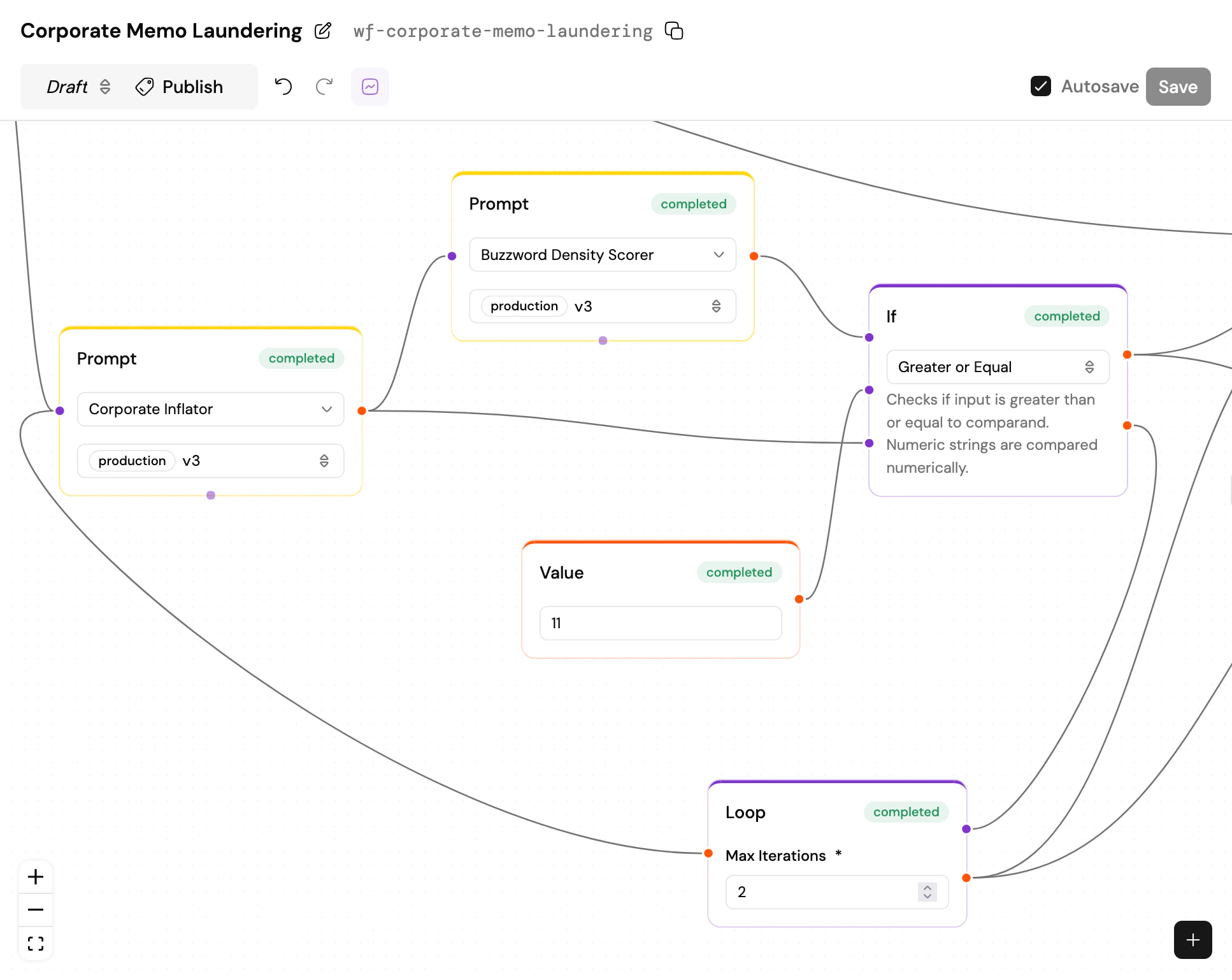
The canvas is a drag-and-drop node editor. Add nodes from the + button at the bottom right, then wire them together by dragging connections between their handles.Data flows left to right. Each node has input handles on the left and output handles on the right. Connect an output to an input and data moves between them when the workflow runs.Everything is a string. Structured data travels as JSON strings. You don’t need to define schemas between nodes – the transformation nodes (String, Array, JSON Query) help you reshape data along the way. It’s deliberately simple: if you can read a JSON blob, you can understand what’s flowing through your workflow.
The workflow canvas: nodes, wiring, and the toolbar
The Loop node is special: it can re-trigger Prompt and Workflow nodes via a bottom handle, creating iterative cycles. Other nodes are deterministic and wouldn’t benefit from re-triggering.
When a control flow node doesn’t activate an output, the entire downstream branch is marked as skipped. Skipped nodes produce no output and consume no resources.When multiple edges wire into the same input handle, the values merge. If two active branches both feed into a summary prompt, their outputs arrive as a JSON array. If one of those branches was skipped (say, by an If or Switch upstream), it’s simply ignored – only the active branch’s output arrives. A single active value stays as-is, no wrapping. No nulls to handle, no special cases.
When a workflow run is loaded, every node on the canvas shows a status badge – you can see at a glance what succeeded, what failed, and what’s still pending.Click any node to inspect it. The run pane shows that node’s inputs and outputs. If the node ran multiple times (after a Fanout, for example), a stepper at the top lets you navigate between individual runs. Hit the back button to return to the workflow-level view.The Overview tab in the run pane displays the workflow’s top-level inputs and outputs. If the workflow contains prompts with memory, additional tabs appear for each channel – one per conversation thread that the prompts participated in.
A workflow with prompts, tools, memory, and branching logic is an agent. PromptJuggler doesn’t draw a hard line between “workflow” and “agent” – an agent is simply a workflow that makes decisions. Add a prompt node with tools, wire in some conditional logic, give it memory across channels, and you’ve built one.The channel system lets prompts within a workflow communicate: each prompt node can read from and write to a specific channel, creating parallel conversation lanes. One prompt gathers requirements, another researches, a third synthesises – each on its own channel, all orchestrated by the workflow.
Workflows use the same naming and versioning system as prompts. The one extra rule: when you publish a workflow, every prompt and sub-workflow it references must already be published. No draft dependencies allowed in a pinned version. This ensures that a published workflow produces the same result every time.
You can build remarkably sophisticated systems from simple, composable pieces. A Fanout node splits an array into parallel prompt runs. A Loop node retries until a condition is met. An If node routes data based on the result of a previous step. Each node is straightforward on its own; the power is in how you connect them.Think LEGO. Except the bricks can talk to AI models.